
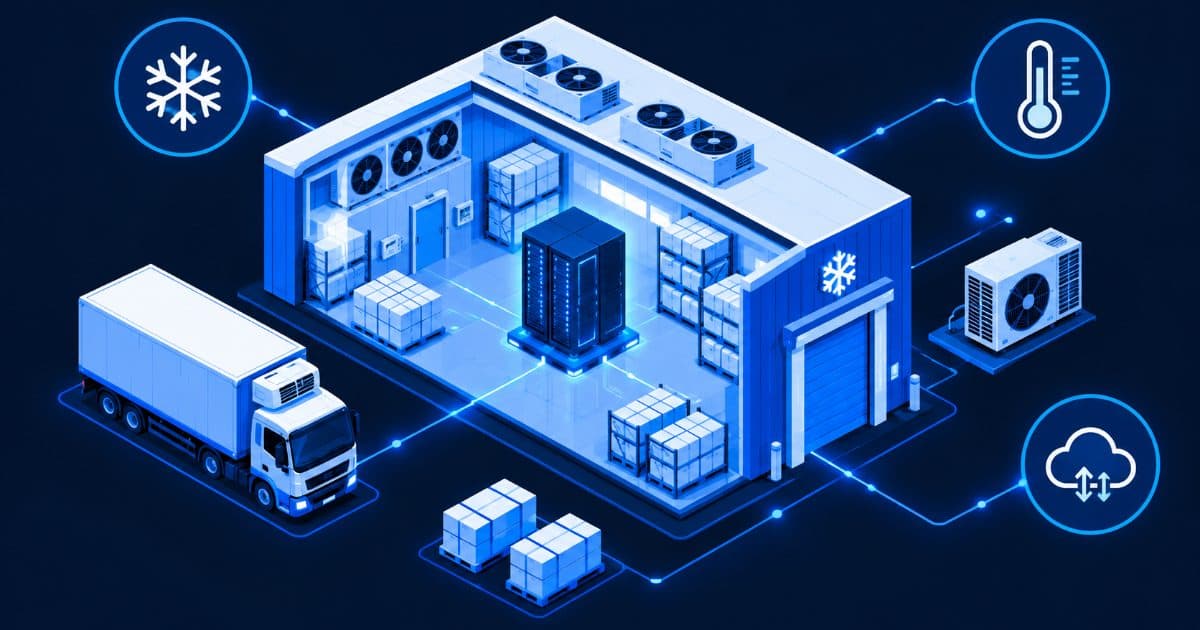
Server Setup for Cold Storage and Cold-Chain Warehouses in India
Quick answer: do not put the server inside the cold room. A cold-chain facility needs a small, dry, temperature-controlled room outside the chilled zone for one or two servers, plus temperature sensors and data loggers inside the chambers that report to those servers over the network. The servers run three jobs: collect and store temperature readings, send alarms, and run the warehouse software (stock, batches, dispatch). Build it with a UPS, a second copy of the data and a maintenance plan, because the one thing a cold store cannot afford is a silent gap in its temperature record. A refurbished tower server is enough for most single-site cold stores: on Serverwale's June 2026 price index a single-Xeon tower with 16–64 GB ECC memory is indicatively ₹18,000 to ₹45,000, before GST.
This guide is for owners, plant heads and IT coordinators of cold storage, frozen-food, dairy, pharma and vaccine-distribution warehouses. It explains where the servers should sit and why, what to monitor, what the server must keep running through a power cut, a sizing and cost illustration using Serverwale's published prices, a comparison of three architectures, and a launch checklist. It does not replace your regulator's rules or your refrigeration engineer: temperature limits, record formats and validation depend on your product and licence.
What does a cold-chain warehouse actually need a server for?
A refrigeration plant keeps the chamber cold. A server keeps the evidence and the workflow. Four jobs are typical:
- Temperature and humidity logging. Sensors in each chamber, dock and vehicle bay send readings every minute or so; the server stores them with timestamps so you can show a customer or auditor what happened and when.
- Alarms. If a chamber drifts out of its band or a door stays open, the server sends an SMS, WhatsApp or email alert to the person on duty, and logs who acknowledged it.
- Warehouse management. Batch and expiry tracking, put-away locations, FEFO (first-expiry-first-out) picking, dispatch notes and invoices. The general version of this workload is covered in our WMS server setup guide for e-commerce warehouses; cold stores add the temperature layer on top.
- Cameras and access control. Dock cameras, door sensors and entry logs. Storage for video grows quickly, so size it separately using the CCTV and NVR storage sizing guide.
None of these needs a GPU or a large rack. They need reliability, power protection, storage that does not fill up unnoticed, and a second copy of the data.
Why the temperature record matters so much
Cold-chain failures are usually invisible until someone looks at a log. A 2020 cross-sectional study in Tropical Diseases, Travel Medicine and Vaccines (Das et al.), which put electronic data loggers in vaccine storage devices across three Indian states (Bihar, Gujarat and Kerala), found that vaccines were exposed to temperatures below 0 °C for 14.8% of storage time overall and above 8 °C for 6.6%. Time spent inside the 2–8 °C band ranged from 56.7% at sub-district stores to 75.4% at state and division stores. The authors noted that routine manual monitoring did not capture these excursions. The study was carried out in 2014–15 on public-sector vaccine stores, so treat it as evidence of why continuous logging matters, not as a statement about any private facility today.
The same point shows up in the standards. The WHO prequalification terms and definitions document sets the acceptable storage range for vaccines at +2 °C to +8 °C and requires that, for a vaccine cold room, all parts of the room stay inside that band under any load. WHO also defines “independence” for refrigerators as the number of hours the vaccine compartment stays within +2 to +8 °C after external power is cut. Your servers and sensors need to survive the same power cut, otherwise the record has a hole exactly when the risk is highest.
Whatever you store, the numbers to follow are the ones in your product labelling, your customer contracts and your regulator’s rules (for example FSSAI conditions for food businesses, or the drug regulator’s rules for pharma). Ask your quality manager for the exact limits and record-keeping frequency, then configure the system to match. This guide deliberately does not quote a single “correct” temperature for all products.
Where should the server go?
Outside the cold zone, in a conditioned room. Standard servers are designed for office-like air. ASHRAE’s thermal guidelines for data-processing equipment, as summarised by TechTarget, give a recommended range of 18 to 27 °C for class A1 to A4 hardware and an allowable A1 range of 15 to 32 °C, and assume temperature changes of no more than 5 °C per 20 hours. A chamber at +2 to +8 °C or a freezer far below zero is outside that envelope, and cold air meeting warm equipment also invites condensation. Before putting any electronics in or near a cold zone, read the manufacturer’s datasheet for operating temperature and humidity; do not assume.
| Location | Suitable for | Main risk |
|---|---|---|
| Inside the chilled chamber | Sensors, probes and data loggers rated for that temperature | A general-purpose server will be outside its datasheet limits; condensation on a cold-to-warm move |
| Dock, vestibule or anteroom | Door sensors, wireless gateways, scanners | Temperature swings and humidity each time doors open |
| Small dedicated server room or cabinet in the office/utility area | Servers, switch, firewall, UPS, NAS | Heat if the room is sealed with no cooling; dust |
| Off-site or cloud copy | Backups and, optionally, a mirror of the temperature records | Depends on internet; recurring cost |
Keep the server room away from the plant room’s heat, vibration and condenser dust. Our guide on server placement, noise and cooling covers the basics, and the small business data center setup guide shows how to lay out a compact room.
How do temperature readings reach the server?
Most monitoring systems use one of three paths. Ask any vendor which one their loggers use before you buy.
- Wired or Ethernet sensors. Most reliable inside a cold chamber, but cabling has to pass through the insulated wall with a proper seal. Your refrigeration contractor should do this, not the IT team.
- Wireless loggers with a gateway. A radio gateway placed in a relatively warm, accessible spot collects readings from loggers and sends them to the server. Metal walls and thick insulation weaken radio signals, so test coverage chamber by chamber.
- MQTT or similar messaging. MQTT is, in the words of mqtt.org, “an OASIS standard messaging protocol for the Internet of Things” designed as an “extremely lightweight publish/subscribe messaging transport” for connecting remote devices with minimal bandwidth. Many sensors and gateways can publish to an MQTT broker running on your server, which then writes to a database.
Whichever you choose, insist on loggers that store readings locally and upload later when the network or server is down. That way a server reboot or a cable fault leaves no permanent gap. Also ask whether calibration certificates are available for the sensors, since an auditor may ask for them.
What must keep running during a power cut?
Plan for the refrigeration to be on a generator or an automatic transfer switch and the IT room to be on a UPS behind it. A cold store with a generator still sees a gap of seconds to minutes while it starts, and a server that reboots uncleanly can corrupt a database.
- UPS for the IT room. Size it for the total load of servers, switch, firewall, gateway and NAS with headroom, then check the runtime. Our UPS sizing guide explains VA versus watts and why an online double-conversion UPS suits servers.
- Power the network gear too. If the switch or the wireless gateway loses power, the sensors have nowhere to send data even though the server is alive.
- Alert path that does not depend on the same power. Use a GSM modem or a mobile hotspot on its own battery for the SMS alarm, so the on-duty person still gets a message when the building loses grid power and broadband.
- Graceful shutdown. Configure the UPS software to shut the server down cleanly when the battery is low, and to start it automatically when power returns.
Which servers suit a cold store?
For one site with a handful of chambers, a few users and a warehouse application, a single-socket tower server is enough. Towers are quiet, need no rack and fit in an office corner or small utility room; our rack versus tower comparison helps you choose. For a larger facility or multiple sites reporting to one place, a 1U or 2U rack server is easier to manage.
| Facility | Indicative hardware class | Serverwale indicative price (June 2026, before GST) |
|---|---|---|
| Single cold store, a few chambers, small team | Entry tower server, single Xeon, 16–64 GB ECC | ₹18,000 – ₹45,000 |
| Larger cold store or multi-chamber pharma distribution hub, with video | 1U rack server, dual Xeon E5 v3/v4, 32–128 GB ECC | ₹35,000 – ₹85,000 |
| Multi-site operator with central reporting | 2U dual Xeon Gold, 128–512 GB ECC | From roughly ₹65,000 |
These ranges come from Serverwale’s refurbished server price index; the same page lists new-price equivalents of roughly ₹1,20,000 for a tower and ₹3,50,000 for a 1U server. Exact prices depend on CPU, RAM and storage, so call for a quote. See the tower servers page for buy or rent options and the refurbished servers in India page for rack models. Serverwale’s tower-server page states that units are 40-point tested and carry a 3-year warranty, and our guide to post-delivery testing shows what to verify when the box arrives. If you are weighing refurbished against new, the total cost of ownership comparison works through the numbers.
Two practical specification points:
- ECC memory and mirrored disks. ECC RAM corrects single-bit memory errors and RAID 1 or RAID 10 keeps the server running through a disk failure.
- Two drives for the operating system, a separate volume for data. Temperature data grows steadily and a full disk is the most common silent failure of a logging server. Set a disk-space alert at 70% and 85%.
Single server, standby server or cloud: which design?
| Design | How it works | Good for | Watch out for |
|---|---|---|---|
| One on-site server + backup | One server logs and alarms; nightly backups to a NAS and an off-site copy | Single-site cold stores with a small team | An outage stops alarms until you repair or restore; loggers must store readings locally |
| Two on-site servers (primary + standby) | Standby receives replicated data and can take over | Pharma and vaccine storage where a gap in the record is serious | Needs someone who can manage replication and test failover |
| Cloud monitoring only | Gateways upload to a hosted service | Very small stores, multi-site visibility | Subscription cost every year; depends on internet; check data location and export options |
| Hybrid | On-site server for local alarms and logging, cloud or off-site copy for backup and remote viewing | Most growing operators | Two systems to maintain |
For many facilities the hybrid model is the practical answer: the local server keeps working when the internet is down, and the off-site copy protects against theft, fire or flood. Our guide to cloud VPS versus dedicated servers explains the trade-offs, and server rental versus buying helps if capital is tight or the project is seasonal, for example a mango or apple season, or a vaccination drive. Serverwale lists rental on its server rental Delhi page.
How should we back up a cold-chain server?
Follow the 3-2-1 rule described by Backblaze: three copies of your data, on two different types of storage, with one copy off-site. For a cold store that means the live database on the server, a second copy on a NAS in the same building, and a third copy off-site or in the cloud. RAID is not a backup. Pay attention to these points:
- Back up the temperature database and the configuration (alarm rules, contact lists, sensor calibration records), not only the warehouse files.
- Test a restore on a spare machine every quarter. A backup that has never been restored is an assumption.
- Keep records for as long as your regulator and customers require. Ask your quality manager for the retention period and size the storage accordingly.
The practical set-up is covered in the on-premise backup server guide and the backup and disaster recovery guide. For the backup box itself, rent one from the NAS server rental page; NAS versus SAN explains which one you need.
Cost illustration for a single-site cold store
The table below is an illustration using Serverwale’s published ranges and simple addition. It is not a quote, and sensors, loggers, UPS and cabling are priced separately by their suppliers.
| Item | Indicative figure | Source |
|---|---|---|
| One refurbished tower server (primary) | ₹18,000 – ₹45,000 | Serverwale price index, June 2026 |
| Second tower server (standby), optional | ₹18,000 – ₹45,000 | Same |
| One or two servers, hardware total | ₹18,000 – ₹45,000 (one) or ₹36,000 – ₹90,000 (two) | Addition of the above |
| Server AMC (annual) | From ₹6,000 (Basic, remote), from ₹12,000 (Standard, on-site), from ₹25,000 (Premium) | Serverwale AMC page |
| UPS, sensors, loggers, gateway, GSM alert modem | Get quotes from suppliers | Not priced here |
Because server cost is small next to the value of the stock in a cold store, spend your budget on resilience (power, backup, a tested alert path) rather than on a bigger processor. Serverwale’s server AMC page lists the plans, and how server AMC pricing works explains what each tier covers. Standard and Premium plans include spare parts; check the page for the current terms before you decide.
Security and access
The monitoring server is a quality record system, so protect it like one.
- Separate the sensor network from the office network using VLANs, and put a firewall between your warehouse and the internet. Renting is an option if you do not want to buy one outright.
- Give each person their own login so the alarm acknowledgements and any manual edits can be traced to a name.
- Do not let anyone edit past readings. Corrections should be new entries with a reason, not overwritten values.
- Time sync. Use one NTP time source for the server, gateways and loggers so timestamps agree.
- Patch on a schedule and test updates on a spare machine first.
The principles are the same as in the hospital PACS and HIS server guide and the manufacturing SCADA and ERP server guide: reliability first, then access control, then convenience.
Launch checklist
- Get the temperature limits and record-keeping rules for each product from your quality manager and regulator; write them down.
- Choose a conditioned room outside the cold zone for the servers; confirm ventilation or cooling.
- Have the refrigeration contractor place sensors and route cables; test wireless coverage chamber by chamber.
- Choose loggers that store readings locally and have calibration certificates.
- Install the UPS and test how long the server and network gear run on battery.
- Set alarm thresholds, delays for door openings and a named escalation list; test with a real SMS or call.
- Configure 3-2-1 backups and perform one full restore test.
- Set disk, CPU and uptime alerts on the server itself.
- Train staff to acknowledge alarms and to use the manual fallback log if the system is down.
- Take out an AMC or a service plan so someone owns the system after day one.
Frequently Asked Questions
Can I place a server inside a cold room?
Not a standard one. General-purpose servers are designed for office-like air; ASHRAE’s recommended range for A1 to A4 equipment is 18 to 27 °C. Keep the server in a conditioned room outside the cold zone and put only sensors and loggers rated for the chamber inside it. Always read the manufacturer’s datasheet for operating limits.
What does a cold storage warehouse need a server for?
Four things: storing temperature and humidity readings with timestamps, sending alarms when a chamber leaves its limits, running warehouse software for batches, expiry and dispatch, and storing camera footage. The server does not cool anything; it keeps the record and runs the workflow.
What temperature range should a cold chain system be set to?
It depends on the product. The WHO prequalification definitions set +2 °C to +8 °C for vaccines, but frozen food, dairy and other medicines have their own limits. Use the limits on the product label, your customer contract and your regulator’s rules, and configure the alarms to match.
How much does a server for a cold store cost?
On Serverwale’s June 2026 price index, a refurbished single-Xeon tower server is indicatively ₹18,000 to ₹45,000 and a dual-Xeon 1U rack server ₹35,000 to ₹85,000, before GST. Sensors, loggers and the UPS are extra. Call for an exact quote.
What happens to temperature readings if the server goes down?
If the loggers store readings locally, they upload the missed data when the server returns, so there is no permanent gap. Choose loggers with local memory, keep the server on a UPS, and use a separate battery-backed SMS path so people are alerted during an outage. A standby server is worth considering for pharma and vaccine storage.
Should a cold store use cloud monitoring or an on-site server?
Many facilities use both. An on-site server keeps logging and alarming when the internet is down, and an off-site or cloud copy gives remote viewing and protects against fire or theft. Cloud-only is simplest for very small stores but adds a recurring fee and depends on connectivity.
Plan your cold-chain server setup with Serverwale
Tell us how many chambers you monitor, how many users and cameras you have, and whether you need a standby, and we will suggest a server, a backup arrangement and a maintenance plan. Call or WhatsApp +91-87962-44410, or contact us for a quote. You can also look at ProStation Systems if you want a new custom-built tower server.
Sources: WHO prequalification — VAX IMD Terms & Definitions, v1.2 (July 2025); Das et al., Trop Dis Travel Med Vaccines, 2020 — Temperature integrity and exposure of vaccines to suboptimal temperatures in cold chain devices in three states of India; TechTarget — Data center temperature and humidity guidelines (ASHRAE); MQTT.org; Backblaze — The 3-2-1 backup strategy. Prices and terms are taken from Serverwale’s published tower servers, price index and AMC pages and are indicative.